Sunday, October 19, 2008

personality color test results

Today morning i attempt personality color test at this site http://www.testcolor.com/, and got below result.


Result of My test :


Your results present a correlation ratio with our model superior to 98 % .
( In a general way, a result can be taken into account if this ratio is superior to 30 %.)


Your Profile :


You are 42 % extrovert and 58 % introvert.

Independently of any order of importance :
You are intellectual and intelligent, you wonder and you inquire before taking any action.
You are also creative, you always have new ideas, and your inspiration comes from the inside.
Finely you are a manager and a structured person, you know how to take into account the needs of each person while leading them towards the set goals.


Your attitude towards the environment :


facts

feelings

idees


At first, at 38%, you are attached to moral values and feelings, and you have an emotional relation with the environment.


Then, at a rate of 35%, you are centered on your thoughts and your actions are determined by your knowledge and your experience.


Finally, at 25%, you are focused on the facts and on the reality, and your decisions are determined by your perception of facts.


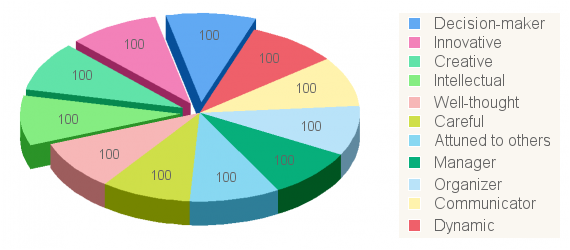
Your highest qualities today :

At 22 %, you are intellectual and intelligent, you keep wondering and inquiring before setting up your next step or defining your values.

At 21 %, you are a creative person, with always new ideas, and you know how to apply them.

At 18 %, you are creative, you know how to see beauty, you are intuitive and your inspiration comes from the inside.

At
18 %, you are a manager and a structured person, you know how to take into account the needs of each person while leading them to the fixed goals.

At 18 %, you are thoughtful and deep, you think before getting into action and you know how to communicate your knowledge.

Finely, you are a manager and a leader, and you know how to organize groups of people and how to give them your energy, you are thoughtful and capable of listening to others, you take into account the needs of others before setting up the defined objectives.

Saturday, October 18, 2008

Bachpan Ka Zamana Hota Tha,


Bachpan Ka Zamana Hota Tha,
Khushio.N Ka Khazana Hota Tha.

Chahat Chaand Ko Paane Ki,
Dil Titli Ka Deewana Hota Tha.

Rone Ki Wajha Na Hoti Thi,
Hasne Ka Bahana Hota Tha.

Khaber Na Thai Kuch Subho Ki,
Na Shamo Ka Thikana Hota Tha.

Daadi Ki Kahani Hoti Thi,
Pariuon Ka Fasana Hota Tha.

Pedho Ki Shakhe Chutey They,
Mitti Ka Khilona Hota Tha.

Gam Ki Zuban Na Hoti Thi,
Na Zakhmo Ka Paymana Hota Tha.

Barish Mein Kagaz Ki Kashti,
Har Mousam Suhana Hota Tha.

Wo Khel Wo Sathi Hotey They,
Har Rishta Nibhana Hota Tha.

Friday, October 17, 2008

jab Rulaana Hi Tha Tujhe Toh Phir Hasaaya Kyun

(jab Rulaana Hi Tha Tujhe Toh Phir Hasaaya Kyun
Saath Rehkar Bhi Hai Juda Toh Paas Aaya Kyun)

(kyun Yakin Uth Gaya Dil Se Kahin Wafaaon Ka
Pyaar Mehsus Kyun Hone Laga Gunaaho Sa)
Aaya Apane Bich Mein Kisika Saaya Kyun
Jab Rulaana Hi Tha Tujhe Toh Phir Hasaaya Kyun
Saath Rehkar Bhi Hai Juda Toh Paas Aaya Kyun

(tu Ajnabi Ki Tarah Humase Pesh Aata Hai
Chand Lamhe Bhi Hamein Tu Na De Paata Hai)
Aisi Kya Hamane Ki Khata, Hame Sataaya Kyun
(jab Rulaana Hi Tha Tujhe Toh Phir Hasaaya Kyun
Saath Rehkar Bhi Hai Juda Toh Paas Aaya Kyun)


Thursday, October 16, 2008

jaane kahaan gae wo din

jaane kahaa.n gae vo din, kahate the terI raah me.n
nazaro.n ko ham bichhaae.nge
chaahe kahI.n bhI tum raho, chaahe.nge tumako umr bhar
tumako naa bhuul paae.nge
jaane kahaa.n gae ...

mere kadam jahaa.n pa.De, sajade kiye the yaar ne - 2
mujhako rulaa rulaa diyaa, jaatI huI bahaar ne
jaane kahaa.n gae ...

apanI nazar me.n aaj kal, din bhI a.ndherI raat hai - 2
saayaa hI apane saath thaa, saayaa hI apane saath hai
jaane kahaa.n gae ...

Wednesday, October 15, 2008

Ye na thee hamaree qismat ke wisaal-e-yaar hota

Ye na thee hamaree qismat ke wisaal-e-yaar hota
it was not in my fate to meet my lover

agar aur jeete rehte yahee intezaar hota
had I lived longer, this would still be my only desire

2. Tere waade par jiye ham to ye jaan jhoot jaanaa
to live on your promise is to make my life a lie

ke khushee se mar na jaate agar ‘eitabaar hota
would I not have died of happiness if i trusted it

3. Teree naazukee se jaana ke bandha tha ‘ehed_booda
from your frailty I learnt that the promise was delicate

Life Gives Answers In Three Ways,

Life Gives Answers In Three Ways,
It Says Yes And Gives Whatever U Want,
It Says No And Gives U Something Better
It Says Wait And Gives U The Best
“Don’t Just Dream. Live You’re Dream.”

Tuesday, October 14, 2008

illustrator blending gradient

illustrator 's blending gradient


"Love Does Not Fail For You When You Are Rejected or Betrayed or Apparently Not Loved. Love Fails For You When You Reject, Betray, and Do Not Love".  Adi Da

maaN sunaao mujhe vo kahaanii

maaN sunaao mujhe vo kahaanii
jis men raajaa na ho na ho raanii

jo hamaarii tumhaarii kathaa ho
jo sabhii ke hriday kii gaathaa ho
gandh jis men ho apanii dhaaraa kii
baat jis men ho apasaraa kii
ho na pariyaaN jahaaN aasamaanii

vo kahaanii jo haNsanaa sikhaa de
peT kii bhuukh ko bhii miTaa de
jis men sach kii bhaarii chaaNdanii ho
jis men ummiid kii roshanii ho
jis men na ho kahaanii puraanii

Monday, October 13, 2008

How To Make 3D Vector Vintage Stars


How to Make A 3D Vector Vintage Star

1. Make your star shape


Use the Star tool and hold Shift to make a Star shape (or any shape you want, really) on the artboard. (everything you see here is exact size).

How to Make A 3D Vector Vintage Star

2. Extrude your shape


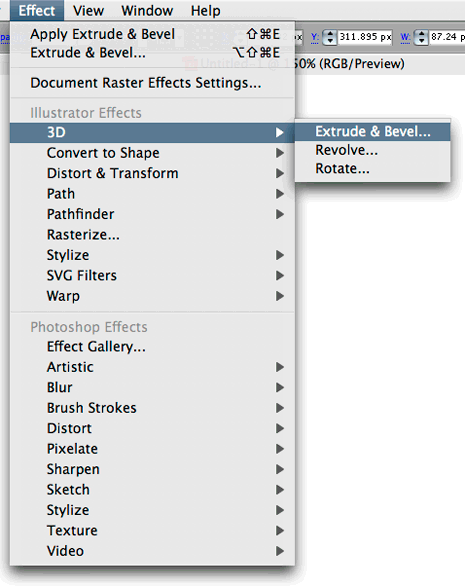
With your Star selected, in the Effect menu go to 3D > Extrude and Bevel.
How to Make A 3D Vector Vintage Star

Check the ‘Preview’ option so you can see what you’re working with.

How to Make A 3D Vector Vintage Star

Now you should see something like this:

How to Make A 3D Vector Vintage Star

Now take the ‘Perspective’ setting all the way to the right (160 degrees)

How to Make A 3D Vector Vintage Star

Now make your Extrude depth something like 900 or so.

How to Make A 3D Vector Vintage Star

Click on the blue box and drag to get your desired rotation.

How to Make A 3D Vector Vintage Star

Click OK, and you should have something like this:

How to Make A 3D Vector Vintage Star

3. Expand Appearance


Now that we have our 3D shape, we will most likely want to have a little more control over it. Go to Object > Expand Appearance and click OK to get rid of the effect and separate our effect into individual shapes that we can edit.

How to Make A 3D Vector Vintage Star

You’ll notice that we now have individual shapes for each side of the 3D star shape (and the effect s gone as well, which is good). Great! Now lets make a few more changes.

How to Make A 3D Vector Vintage Star

4. Fill the Sides with a Gradient.


To do this, you can either ungroup (about 3 times) until you can select the individual shapes, or you can use the Direct Select Tool (white arrow) to select the individual shapes and fill them with a gradient.

How to Make A 3D Vector Vintage Star

Do the same for all of the sides.

How to Make A 3D Vector Vintage Star

This is pretty much a 3D Vintage Star already, but there are a few extra touches we can add to take it a step further.

5. Offset the Front Face of the Star


To do this you will, again, either have to ungroup everything until you can select an individual shape, or use the Direct Select Tool (white arrow).

How to Make A 3D Vector Vintage Star

Select the face of the Star.

How to Make A 3D Vector Vintage Star

In the menu, go to Object > Path > Offset Path.

How to Make A 3D Vector Vintage Star

Choose a negative value for the offset. (Negative = Smaller/Inside the Selected Shape) I chose -8px.

How to Make A 3D Vector Vintage Star

Click OK and you will see your original Star face, and the new offset one.

How to Make A 3D Vector Vintage Star

Click once on the blank artboard to deselect everything, then use the Direct Select Tool to select the new (smaller) star.

How to Make A 3D Vector Vintage Star

Fill this smaller star with a different color to add something a little extra to your vintage star design.

How to Make A 3D Vector Vintage Star

Take it a step further:


6. Add a stroke around the entire group.


Hit Command/Control + A to select everything, then hold Option/Alt, click, drag and release to duplicate your shape. (or you can copy and paste if you like)

How to Make A 3D Vector Vintage Star

Now, select the NEW group of shapes and if they are grouped, you must ungroup them until you can select individual shapes with the black arrow. DON”T SKIP THIS STEP.

How to Make A 3D Vector Vintage Star

Now, with all of the new (individual) shapes selected, in the Pathfinder palette (Window > Pathfinder) hit the “Add to Shape Area” button.

How to Make A 3D Vector Vintage Star

Keep everything selected the way it is and immediately hit the “Expand” button in the Pathfinder palette.

How to Make A 3D Vector Vintage Star

Sweetness! Now we have a single vector path that is an exact copy of our 3d Star shape. Now all we have to do is add a Stroke and Align. You can change the fill if you want, but you won’t be able to see it anyway. It’s up to you. I chose a dark 3px Stroke.

How to Make A 3D Vector Vintage Star

7. Align Your 2 Shapes


IMPORTANT: To align, first, make sure your shape on the left (the ‘3d’ shape is grouped). Then select both of your shapes like below, and hit these two buttons in the Align palette (Window > Align) in any order. (you probably want to uncheck ‘align to artboard’ in the palette options first).

How to Make A 3D Vector Vintage Star

If your shape with the stroke is on top it will look like this. So all you have to do to get it behind the 3d shape is (with the black arrow) click on the blank artboard once to deselect everything. Then select your top shape with the stroke on it, and hit Command/Control + { until it gets behind your 3d star shape.

How to Make A 3D Vector Vintage Star

Now it should look something like this!

How to Make A 3D Vector Vintage Star

That should be enough to get you started, but I have one extra tip for you before you go…

Extra Bling


You can literally do anything you want from this point, but here is a quick tip to take it one more step:

You can easily make the front of your vintage star appear to be ‘inset’ by simply duplicating the smaller star shape, filling it with a dark color, and nudging it up and over. Like this:

How to Make A 3D Vector Vintage Star

Yeh zindagi bari ajeeb si

Yeh zindagi bari ajeeb si
Kabhi gulzar si kabhi bezar si
Kabhi khushi hamare sath sath
Kabhi ghamon ki barsat si
Yeh zindagi bari ajeeb si
Kabhi tofanon main bhi hain raste
Kabhi manzilon ka pata nahi
Kabhi do kadam pe zindagi
Kabhi saddion tak intizar si
Yeh zindagi bari ajeeb si
Kabhi her pal imtihan hai
Kabhi bin mange inam hai
Kabhi kuch nahi
Kabhi sab kuch si
Yeh zindagi bari ajeeb si
Kabhi gulzar si kabhi bezar si